

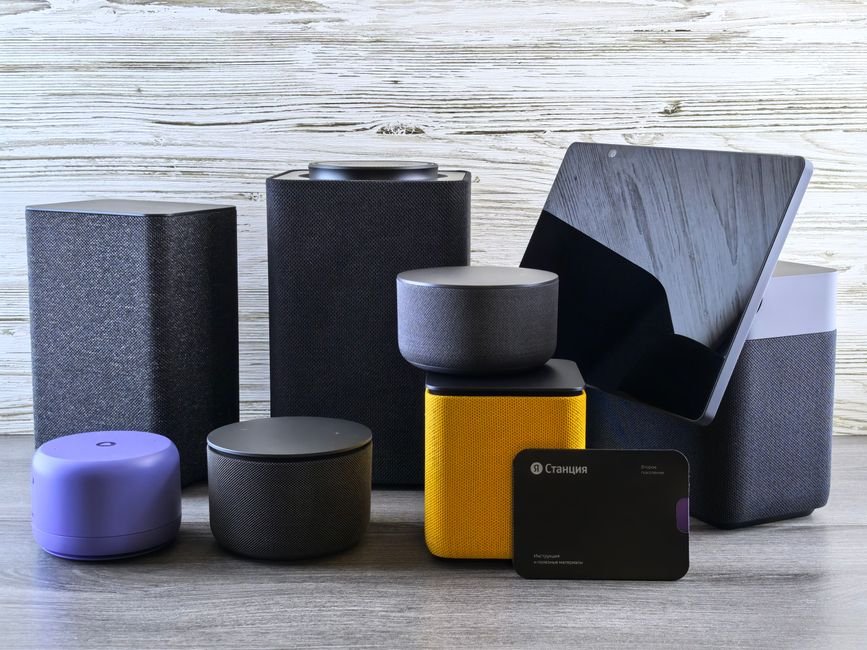
According to recent studies, 70% of households already use at least one smart home device, significantly enhancing security and comfort. Integrating these devices while traveling can seem challenging, but it can actually streamline your trip and provide peace of mind, all while reducing utility bills by up to 15%.
Integrating smart home devices effectively requires a plan and understand the existing technologies. Whether you’re a frequent traveler or an occasional weekend getaway person, these tips will help you manage your smart devices with ease. Let’s explore how you can optimize your home automation network through smart hub integration and wireless connectivity while enjoying your time away from home.

Use a Smart Hub to Centralize Control
A smart hub is a must-have if you’re serious about home automation. It serves as the central control point for all your devices, allowing you to manage them seamlessly from one app. This can save you from the hassle of juggling multiple apps for different devices.
Many people overlook the importance of having a dedicated hub; without it, you’re tied to a less efficient, disjointed system.
When integrating your hub, look for one that supports a wide range of devices, such as smart lightscameras, and thermostats. I’ve found that hubs like SmartThings or Hubitat can handle various brands, giving you flexibility in your device choices.
Once connected, you can easily program routines and automations that fit your travel schedule, like automatically turning off lights when you leave for the airport.
Choose Compatible Smart Devices for Seamless Interaction
Not all smart devices play nicely together. One of the biggest mistakes I see people make is purchasing devices that aren’t compatible with their chosen smart hub. Before you buy, check compatibility with your hub and other devices in your network. For example, if you have a specific brand of smart thermostat, ensure your hub supports it.
This knowledge can save you the frustration of needing to return devices that don’t connect.
Also, consider devices that support IoT integration. For instance, smart locks that can generate temporary access codes for guests while you’re away can enhance your travel security. With these devices, you can manage settings from anywhere, ensuring your home is secure even during long trips.

Automating Your Home for While You’re Away: Routine Scheduler
Once your devices are connected, it’s time to set up automation routines. Many devices allow you to create schedules based on your preferences. For example, while I’m traveling, I set my smart lights to turn on and off at different times, simulating occupancy. This can deter potential intruders and give you peace of mind.
Additionally, automating your thermostat can save money while you’re away. Lowering the temperature in winter or using the cooling system effectively in summer can significantly reduce energy bills. Some advanced thermostats even learn your habits and adjust autonomously, maximizing comfort when you’re home and efficiency when you’re not.
Taking Advantage of Wireless Connectivity for Remote Access
Wireless connectivity is what makes smart home devices so powerful and convenient. Ensure that your devices have robust internet access. You don’t want to be on your trip and find out that your smart lock fails to connect because of poor Wi-Fi coverage. A mesh network can boost coverage, giving you peace of mind while on vacation.
Moreover, many smart security systems allow live video streaming and alerts directly to your smartphone. It’s reassuring to check in on your home from anywhere, especially to see if package deliveries have arrived. I always keep the security cameras operational while away, as they add an additional layer of protection and notify me of any unusual activity.
Don’t Forget the Basics: Safeguards and Monitoring
While fancy gadgets can enhance convenience, it’s crucial to remember the basics. Set up alerts for significant changes in your home. If you have water sensors, knowing about a leak immediately can save you thousands in damages. If your smoke alarms are smart-enabled, they can send notifications to your phone if they detect smoke.
Regularly check the batteries and system updates to keep devices functioning responsibly.
If you are also dealing with home security concerns while you’re traveling, I recommend exploring options between monitored and unmonitored systems. For a more comprehensive look at each, check my guide on Monitored vs Unmonitored Home Security Systems.
Manage Smart Home Devices: Ideal Strategies for Frequent Travelers
For those who travel frequently, remember to simplify your integration process. Invest time initially to set up your system correctly; it pays off later. Use device groupings in your hub so you can easily adjust settings or troubleshoot issues from one location. A multi-device setup can appear complex, but once you find your rhythm, it becomes second nature.
Moreover, take advantage of vacation modes if available. These settings automatically adjust your devices based on your absence. You’ll save energy, increase safety, and maintain a comfortable environment upon your return.
Final Recommendation: Streamlining Your Smart Home Devices
For those looking to create an efficient smart home system, the Samsung SmartThings Hub is the top choice for compatibility with various devices. If you prefer a more user-friendly option, the Google Nest Hub suits those who value ease of use over extensive compatibility.
Our write-up on organized with smart picks up where this leaves off.
Frequently Asked Questions
How do I connect my smart home devices?
To connect smart home devices, first ensure they are compatible with your home network. Typically, you will download the manufacturer's app, create an account, and follow the prompts to connect your devices via Wi-Fi or Bluetooth.
Can smart home devices work together?
Yes, many smart home devices can work together, especially if they are from the same ecosystem or support common standards like Z-Wave or Zigbee. Using a smart home hub or compatible apps can greatly enhance interoperability among different brands.
What are the benefits of integrating smart home devices?
Integrating smart home devices offers convenience, enhanced security, energy efficiency, and the ability to automate routines. This allows you to control everything from one app, streamlining your daily activities and improving your overall home management.
Why do smart home devices need a hub?
Smart home devices often need a hub to facilitate communication between devices, especially when they use different protocols. The hub acts as a central point for managing and controlling multiple devices, providing a unified interface for user commands.
Is it safe to use smart home devices while traveling?
Using smart home devices while traveling can enhance security by allowing you to monitor your home remotely and control appliances. However, ensure that your devices are secure and keep your Wi-Fi network protected to minimize any risk of unauthorized access.


Leave a Reply