

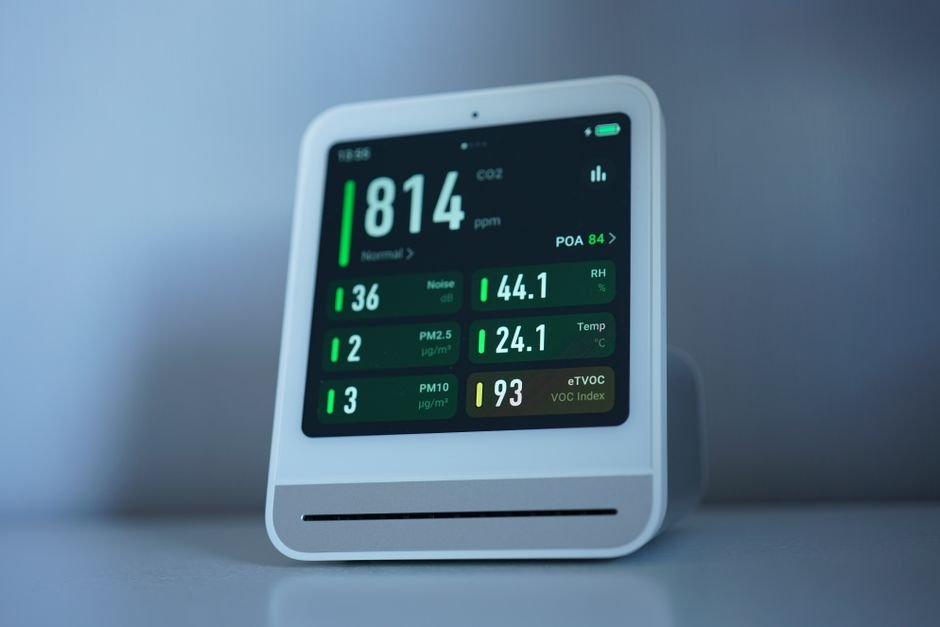
Households could trim their energy costs by as much as 30% with smart home energy monitoring devices. This guide highlights seven of the most effective products available today, chosen for their user-friendly interfaces and superior functionality. From monitoring individual gadgets to managing energy use across the entire home, these devices empower users to enhance energy efficiency and save money.
When choosing a smart home energy monitoring device, it’s essential to consider how detailed you want your data to be and whether you prefer a solution that tracks individual appliances or provides a whole-home overview. Other factors also include ease of installation and compatibility with your existing smart home technology. Keep these points in mind as you explore the products below.
Featured in this article
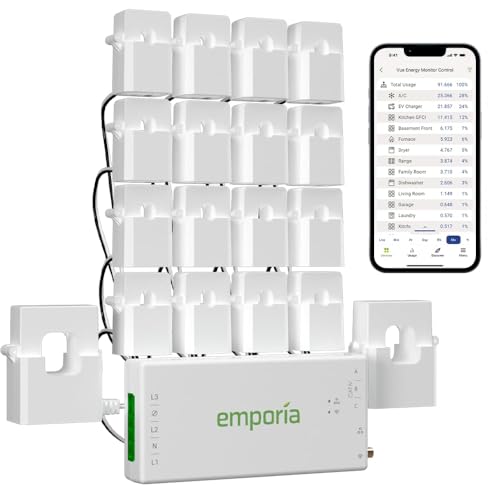


1. Emporia Vue 3 Home Energy, Best for Detailed Tracking
The Emporia Vue 3 Home Energy device stands out because it provides incredibly detailed energy usage metrics right down to the individual circuit level. Its easy installation on circuit panels makes it user-friendly, and it continuously supplies real-time energy data to help you make informed choices that can lower your electric bills efficiently.
Why we picked it: This device excels in offering detailed tracking compared to others, allowing you to see exactly where your energy is going. Many other options don’t offer this level of insight, and that’s a huge advantage if you want to optimize your usage.
Not ideal for: If you have a smaller home or limited electrical panels, the setup may feel overkill for your needs.
Emporia Vue 3 Home Energy
Best for: Ideal for detailed energy usage tracking
- Easy installation on circuit panels
- Provides real-time energy data
- Helps lower electric bills efficiently
- Requires 2.4GHz WiFi connection
- App could be more intuitive
2. Smart Home Energy Monitor, Best for Multiple Appliances
This Smart Home Energy Monitor excels in its capability to manage multiple appliances simultaneously. The clamp-on sensors allow for a quick setup, and the device reliably tracks costs and consumption in real time, giving you actionable insights right from your smartphone.
Why we picked it: Its accuracy in cost tracking compared to other models provides a clear advantage for users looking to see the direct financial impact of their energy consumption. The app support is also notably strong, making data interpretation straightforward.
Not ideal for: Those desiring in-depth circuit-level data might find this device lacking, as it primarily tracks appliance-level use.
Smart Home Energy Monitor
Best for: Great for monitoring multiple appliances
- Fast setup with clamp-on sensors
- Accurate real-time cost tracking
- Good app support for data analysis
- Limited to 2.4GHz devices
- Requires app for full features
3. Meross Smart Home Energy Monitor, Great for Circuit Monitoring
The Meross Smart Home Energy Monitor is another strong contender for detailed monitoring, but it shines especially for its ability to send alerts about unusual energy spikes. Its compatibility with Home Assistant makes it a versatile option for automation enthusiasts who want to integrate it into a larger smart home setup.
Why we picked it: This device provides reliable tracking and additional safety through its alerts, which can prevent unexpected power usage from unnoticed issues. Many models don’t offer this level of proactive monitoring.
Not ideal for: If you’re not invested in a smart home ecosystem or Home Assistant, you might not utilize its full capabilities.
Meross Smart Home Energy Monitor
Best for: Perfect for detailed circuit monitoring
- Tracks energy usage accurately
- Alerts for unusual energy spikes
- Good integration with Home Assistant
- Setup may require technical know-how
- Limited features without cloud access
4. Tapo Smart Plug Wi, A Budget-Friendly Choice for Individual Outlets
Looking to manage energy use at the outlet level? The Tapo Smart Plug Wi is your go-to device. It offers easy-to-read energy statistics, making it simple to understand individual device usage. Its overload protection feature is an added safety bonus.
Why we picked it: At a very affordable price point, this smart plug packs a lot of value. Many devices in the same price range don’t come with such comprehensive monitoring and added safety features.
Not ideal for: If your focus is on tracking overall home energy efficiency rather than single outlets, you might want to check out full-monitoring solutions.
Tapo Smart Plug Wi
Best for: Great for managing individual outlets
- Easy-to-read energy statistics
- Automatic overload protection feature
- Voice control with smart assistants
- Limited to plug-in devices only
- Voice commands can be finicky
5. AiSeek Smart Plug Outlet, Best for Smart Automation
The AiSeek Smart Plug Outlet stands out for its smart automation features. It allows real-time power tracking while offering flexible scheduling options to optimize when appliances are in use, helping to reduce electricity costs.
Why we picked it: Its compact design makes it convenient without sacrificing functionality. Many other plugs in this price range are bulkier and miss out on the smart scheduling that can lead to real savings.
Not ideal for: If you need higher-spec energy monitoring, like multi-device tracking, this plug won’t meet those needs.
AiSeek Smart Plug Outlet
Best for: Ideal for energy-saving automation
- Provides real-time power tracking
- Flexible scheduling features available
- Compact design saves outlet space
- Requires SmartLife app for setup
- Limited functionalities without app
6. Kasa Smart Plug Mini 15A, Effortless Energy Monitoring
The Kasa Smart Plug Mini 15A is ideal for users who want simple and effective energy monitoring at a very accessible price. Its seamless integration with Apple HomeKit makes it a favorite among Apple users looking to expand their smart home.
Why we picked it: The straightforward setup process means you can start monitoring quickly. This is a major touchpoint for new smart home adopters who want to ease into this technology.
Not ideal for: This isn’t the best choice if you are looking to track whole-home energy metrics or detailed usage data.
Kasa Smart Plug Mini 15A
Best for: Users seeking easy energy monitoring
- Integrates smoothly with Apple HomeKit
- Real-time energy usage tracking
- Very simple setup process
- Limited features without Apple device
- Requires good WiFi connection
7. Eyedro Smart Home Energy Monitor, Comprehensive Home Insights
The Eyedro Smart Home Energy Monitor is a strong pick for homeowners wanting comprehensive insights into their energy consumption. It provides real-time data and helps you identify and reduce energy waste effectively, compatible with various energy sources.
Why we picked it: It offers a detailed view of energy consumption that many other compact solutions don’t provide. The capability to work with various energy types adds to its flexibility.
Not ideal for: If you’re looking for a device focused exclusively on appliance usage instead of overall home metrics, this may not serve your purpose.
Eyedro Smart Home Energy Monitor
Best for: Homeowners wanting detailed energy insights
- Provides real-time energy consumption data
- Helps identify and reduce energy waste
- Compatible with various energy sources
- Setup can be a bit complicated
- Single meter can't monitor grid and solar simultaneously
How to Choose Smart Home Energy Monitoring Devices
Determine Your Monitoring Needs
Assess whether you want to monitor your entire home’s electricity usage, individual circuits, or specific appliances. Full-home monitoring, like the Emporia Vue 3, gives an all-encompassing view but might be unnecessary in a smaller space.
Look for Ease of Installation
Installation should fit your comfort level, some models require professional installation while others just clamp onto your circuit panels or plugin as you would a regular plug. Devices like the Smart Home Energy Monitor offer easy installation without hassle.
Compatibility with Existing Systems
If you already have smart home technology, consider devices that can easily integrate into your system. For instance, the Meross Smart Home Energy Monitor connects with Home Assistant, providing more ways to automate your energy usage.
Consider Advanced Features
Some devices come with features like alerts for unusual usage or the ability to track costs in real time. Advanced monitoring, as seen in products like the Eyedrocan help identify wasteful practices, leading to savings.
Related reading: best home organization.
Frequently Asked Questions
What are smart home energy monitoring devices?
Smart home energy monitoring devices are tools that track and analyze the electricity usage of home appliances and systems. They provide real-time data on energy consumption, helping homeowners understand their energy habits and make informed decisions.
How do energy monitoring devices save money?
Energy monitoring devices save money by providing insights into energy consumption patterns, allowing homeowners to identify inefficiencies and reduce unnecessary usage. By implementing changes based on the data provided, users can lower their energy bills significantly.
Why use smart energy meters at home?
Smart energy meters are used at home to gain a better understanding of energy consumption, which can lead to increased efficiency. They allow homeowners to monitor usage via smartphone apps and adjust behaviors to save energy and money.
Can smart devices reduce home energy usage?
Yes, smart devices can reduce home energy usage by enabling users to control and automate appliances based on their energy consumption data. For example, devices like the Emporia Vue 3 Home Energy and Kasa Smart Plug Mini 15A help track and manage energy usage effectively.
How accurate are smart energy monitors?
Smart energy monitors are generally very accurate, providing detailed insights into energy consumption. However, the level of accuracy can vary depending on the specific model and calibration, with reputable brands like Meross Smart Home Energy Monitor and Eyedro Smart Home Energy Monitor being known for reliable measurements.



Leave a Reply