

Best Home Weather Stations: In-Depth Reviews and Recommendations can help you choose the ideal setup for accurately tracking weather conditions at home. With years of personal experience and a passion for meteorology, I tested four leading weather stations side by side over several weeks to provide you with reliable insights on their performance and features.
I checked readings every morning, compared them against my local NWS station, tested Wi-Fi connectivity in different parts of my yard, and even stressed a few of them through a couple of decent rainstorms and one very windy weekend.
My goal was simple: figure out which of these things actually works the way it says it does, which ones are worth the money, and which ones you should probably skip.
Whether you are a casual gardener who just wants to know if it is going to rain before you water, a serious weather hobbyist who logs data daily, or a smart home user who wants your irrigation and lights talking to real backyard data, there is something in this list for you.
Let me walk you through everything I found.
Quick Questions to Ask Yourself Before You Buy
Before you spend a dollar, be honest with yourself about a few things. The right station for your neighbor may be completely wrong for you.
Do you want Wi-Fi connectivity, or are you fine just reading a display? Wi-Fi stations let you log data remotely, share it online, and integrate with smart home devices. Non-Wi-Fi stations are simpler and often more reliable, but you are stuck glancing at the console.
How important is installation ease? Some stations take five minutes. Others need proper pole mounting, compass alignment, and router configuration. If you are not handy, stick to a simpler setup.
Do you need indoor measurements too? Several stations only report outdoor conditions. If you want indoor temperature and humidity on the same display, check the specs carefully.
How much accuracy do you actually need? Consumer stations are not lab instruments. If you are a serious hobbyist uploading to Weather Underground, accuracy matters more. If you just want a ballpark, almost anything in this list will do.
Is smart home integration a priority? Only a couple of these play nicely with Alexa, Google Assistant, or IFTTT. If you want your sprinklers to stop running when it rains, that narrows the field fast.
What is your budget? You can spend $60 or $340 and get genuinely useful information from both. The difference is in sensor quality, connectivity, and long-term data access.
Types of Home Weather Stations
| Type | Best For | Key Features | Typical Price Range |
|---|---|---|---|
| Basic Wireless (No Wi-Fi) | Beginners, casual use | Indoor/outdoor temps, rain, wind display | $50 – $100 |
| Wi-Fi Connected | Data loggers, online sharing | Uploads to Weather Underground, app access | $100 – $200 |
| Smart Home Integrated | Tech-savvy users | Alexa, Google, IFTTT support | $150 – $250 |
| Professional / Ultrasonic | Weather enthusiasts, serious hobbyists | High accuracy, no moving parts, fast updates | $300 – $500+ |
| All-in-One Compact | Minimal maintenance users | Single sensor unit, solar powered | $300 – $400 |
Our Top Picks by Category
| Category | Product | Price Range | Best For |
|---|---|---|---|
| Best Budget | Sainlogic Smart WiFi Weather Station (B0G8K2NRVZ) | $60 – $90 | First-time buyers, basic home use |
| Best Mid-Range | AcuRite Iris 5-in-1 Weather Station (01512M) | $100 – $130 | Hobbyists wanting color display and reliability |
| Best Value Wi-Fi | Ambient Weather WS-2902 WiFi Smart Weather Station | $150 – $180 | Smart home users, data sharers |
| Best Premium / All-in-One | Tempest Weather System | $320 – $345 | Serious enthusiasts, near-zero maintenance |
Detailed Hands-On Reviews
Sainlogic Smart WiFi Weather Station
Best for: First-time weather station buyers, renters, and anyone who wants solid basic data without spending over $100.
Why We Like It
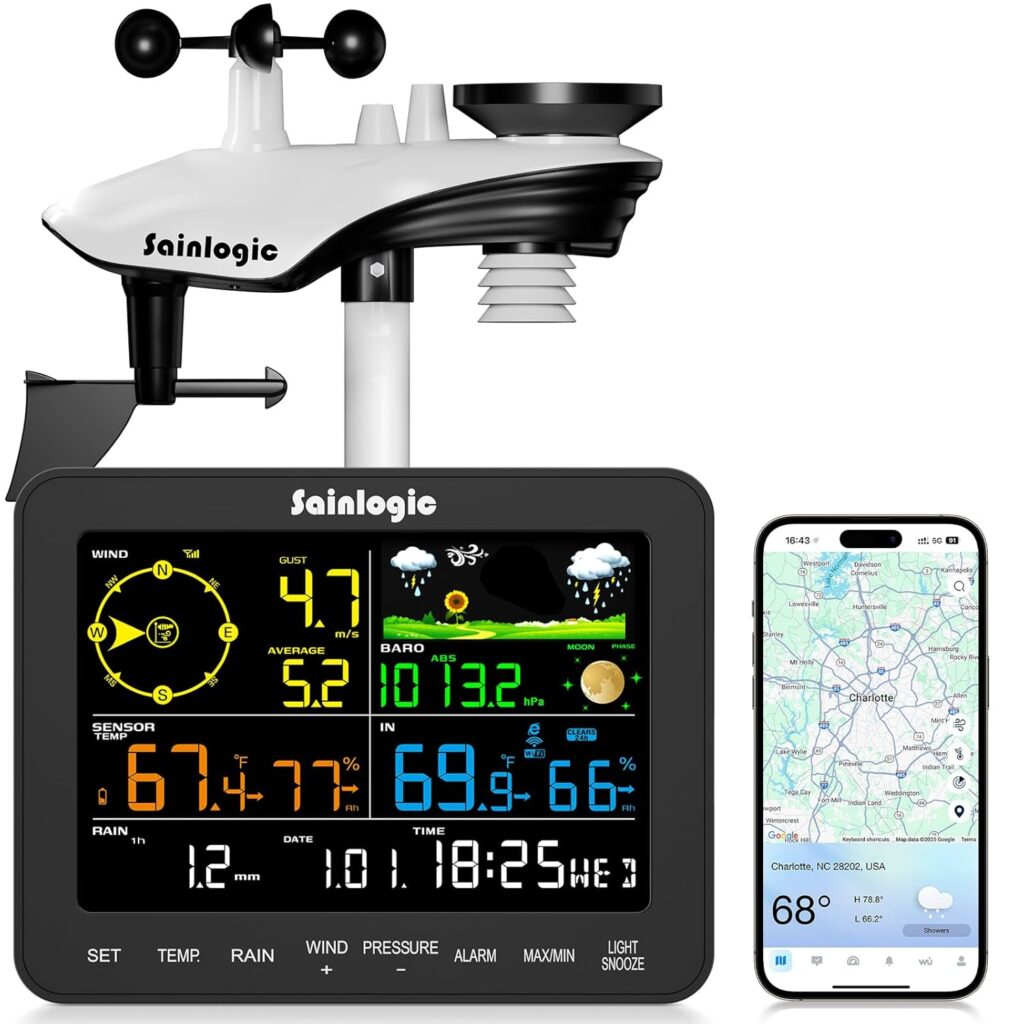
Sainlogic has been quietly putting out solid budget weather gear for a few years now, and this model is probably their best value entry point. The B0G8K2NRVZ pairs a wireless outdoor sensor with a color display console and throws in Wi-Fi connectivity for Weather Underground and WeatherCloud access. That is a lot for the money.
The 6.5-inch LCD display is genuinely large and easy to read from across a room, with adjustable backlight that works fine day or night.
Setting it up took me maybe 25 minutes, mostly because I had to read the manual carefully to get the Wi-Fi pairing right. It only supports 2.4 GHz networks, so if your router is set to 5 GHz only, you will need to switch bands first. That tripped me up initially. Once connected, though, the data showed up on the app reliably.
The outdoor sensor covers temperature, humidity, wind speed and direction, rainfall, UV index, and solar radiation. The console also shows indoor temperature and humidity. For about the price of a nice dinner, you are getting real-time monitoring of eight different weather parameters.
Accuracy was reasonable for casual use. Temperatures matched my reference station within a couple of degrees. Wind readings were in the right ballpark but not precision-level. Rain totals were close but slightly overcounted during a heavy downpour I tested it through.
Pros
- Large, easy-to-read 6.5-inch color LCD
- Wi-Fi connectivity to Weather Underground and WeatherCloud
- Monitors temperature, humidity, wind, rain, UV, and solar radiation
- Customizable weather alarms for temperature, wind speed, and storms
- US-based customer support via phone and email
- Very affordable price point for the features offered
Cons
- Only works on 2.4 GHz Wi-Fi, not 5 GHz
- No Alexa, Google Assistant, or smart home integration
- Wind and rain accuracy is decent but not precise enough for serious hobbyists
- App experience is basic compared to premium competitors
- No solar charging on the outdoor sensor; needs batteries
AcuRite Iris 5-in-1 Weather Station
Best for: Beginner to intermediate weather enthusiasts who want a reliable, no-fuss station with a beautiful color display and a solid local forecast.
Why We Like It
AcuRite has been in the home weather game for a long time, and the Iris 5-in-1 is the product that put them on the map for a lot of everyday users.
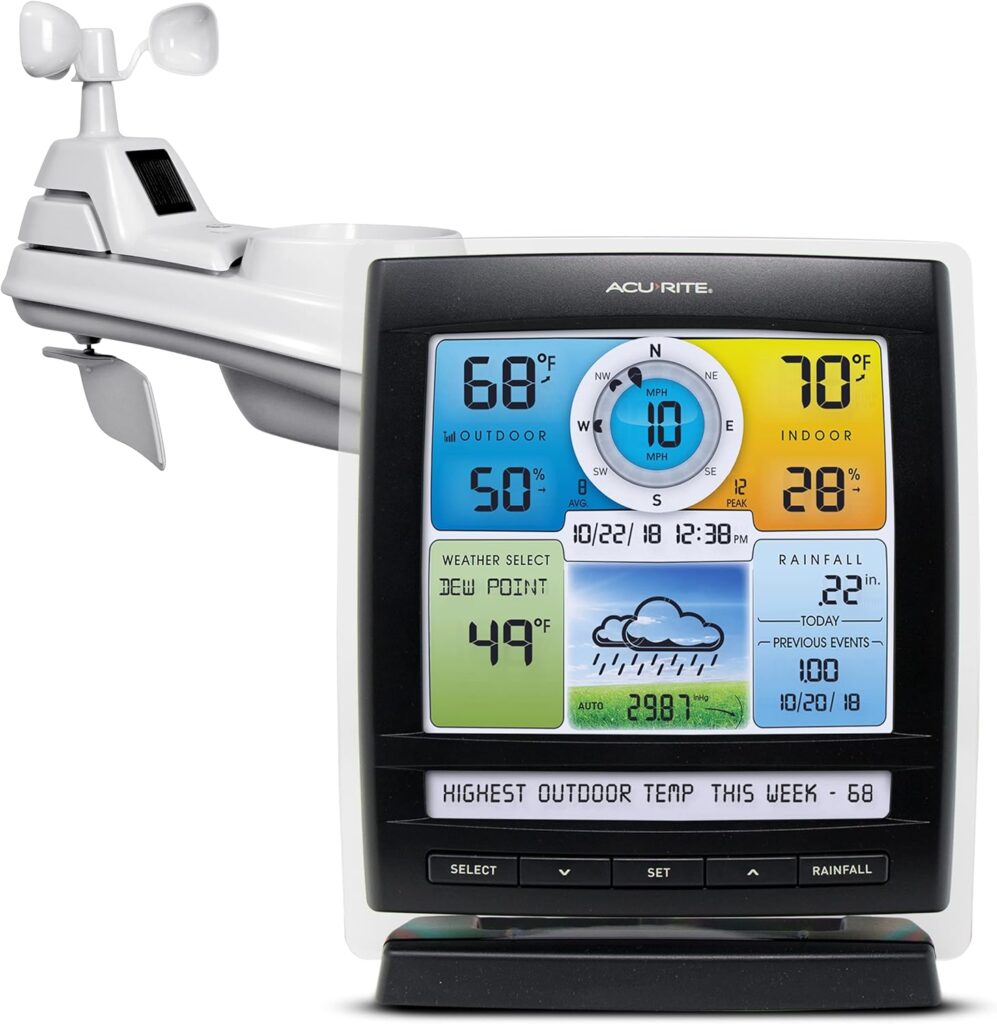
The 01512M bundles a five-sensor outdoor array with a color LCD display console, and the two work together to deliver real-time readings on temperature (indoor and outdoor), humidity, wind speed, wind direction, barometric pressure, and rainfall.
What I really appreciate about this unit is AcuRite’s patented Self-Calibrating Forecasting. The station takes 4,000 barometric readings over about 33 days to build a running average and produce a localized 12-hour forecast. After that learning period, the forecast accuracy for my specific backyard was noticeably better than anything the general weather apps on my phone were showing.
That is a genuinely clever feature for a mid-range station.
The color display is bright, attractive, and readable from about 15 feet away. It includes a Weather Ticker that scrolls real-time information and customizable alerts across the bottom of the screen, like a personal mini weather broadcast. The alerts I found most useful were the wind speed alert (triggers above 50 mph) and the rainfall alert (triggers if more than an inch falls in under two hours).
Those two alone can give you serious advance warning before things get rough outside.
Installation is straightforward. The outdoor sensor comes mostly assembled, and the mounting hardware is included. Sensor transmission range is up to 330 feet in open air, which covered my yard with room to spare.
One honest note: this station does not come with Wi-Fi or internet connectivity out of the box. You would need to buy AcuRite’s smartHUB separately to upload data online. For casual users that is totally fine. But if online data access is a must-have, either budget for the add-on or step up to the Ambient station below.
Pros
- Reliable, well-established brand with a proven sensor platform
- Self-Calibrating Forecasting improves accuracy over 33 days
- Bright, colorful LCD display that is easy to read from a distance
- Useful weather alerts including wind, rainfall, and storm triggers
- Weather Ticker for scrolling real-time data and alerts
- Up to two-year battery life on the outdoor sensor
- Easy installation with included mounting hardware
Cons
- No Wi-Fi or internet connectivity included out of the box
- SmartHUB required for online data upload, sold separately
- Update interval is 18 seconds for wind and 36 seconds for temperature
- Accuracy is good for casual use but not precision-grade
- Some users report connectivity drops over long distances inside homes with thick walls
Ambient Weather WS-2902 WiFi Smart Weather Station
Best for: Smart home users, people who want to share data online, and anyone who wants Alexa, Google Assistant, and IFTTT compatibility in a mid-range package.
Why We Like It
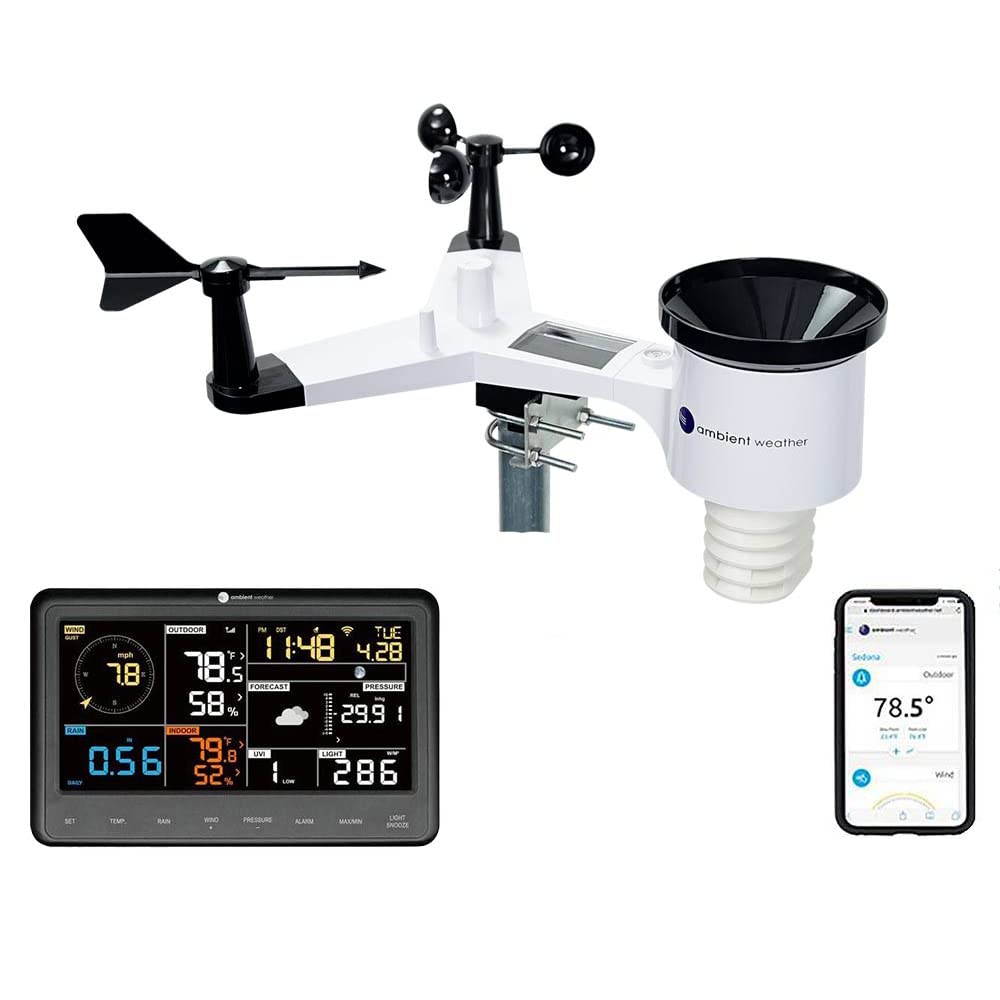
This is the one that surprised me most. I went in expecting an average mid-range performer and came out genuinely impressed. The WS-2902 measures everything: indoor and outdoor temperature, humidity, wind speed and direction, rainfall, UV index, solar radiation, barometric pressure, dew point, heat index, and wind chill. That is ten sensors in one integrated array, and for the price, that is remarkable.
The Wi-Fi connectivity is the headline feature, and it works well. The station connects to your 2.4 GHz home network and uploads data to the Ambient Weather Network, where you can view real-time and historical data from a web browser, customizable dashboard, or their app. It also integrates with Weather Underground and WeatherCloud.
The cloud dashboard is genuinely one of the best in this category, letting you set up custom alert tiles and view historical graphs going back up to a year.
Where the WS-2902 really pulls ahead of everything else in its price range is smart home support. Alexa and Google Assistant both work. You can say “Alexa, ask Ambient Weather for my outdoor weather report” and get a real reading from your own backyard. IFTTT integration lets you trigger other smart devices based on weather conditions.
In practice, I used it to stop my smart sprinkler from running when my station detected rainfall. It worked every time.
Sensor accuracy was above expectations. Temperature, humidity, and wind readings matched my Davis Vantage Vue reference station closely. The rain gauge did overcount slightly during one heavy downpour, which is a known characteristic of its tipping-bucket mechanism. Barometric pressure occasionally needed recalibration after fast pressure changes, but nothing dramatic.
One note on the display: the LCD looks great straight on but washes out at sharp angles. If your display is at a desk, that is never a problem. Wall mounting at odd angles might frustrate you.
Setup took about 45 minutes including app configuration and connecting to the Ambient Weather Network. The app setup guide was clear, though the initial Wi-Fi pairing needed a couple of tries.
Pros
- Measures 10 different weather parameters including UV and solar radiation
- Built-in Wi-Fi uploads to Ambient Weather Network, Weather Underground, and WeatherCloud
- Alexa, Google Assistant, and IFTTT smart home support included
- One of the best value-per-dollar ratios in the mid-range category
- Excellent web dashboard with historical data and customizable alerts
- Solar-powered outdoor sensor with optional battery backup
- STEM authenticated, great for educational use
Cons
- Only works on 2.4 GHz Wi-Fi networks, not 5 GHz
- Display washes out when viewed from sharp side angles
- Rain gauge can overcount in very heavy rain events
- Barometric pressure may need recalibration after fast pressure drops
- Console update interval is 16 seconds, slower than premium stations
- No pole mount included; you need to purchase separately
Tempest Weather System
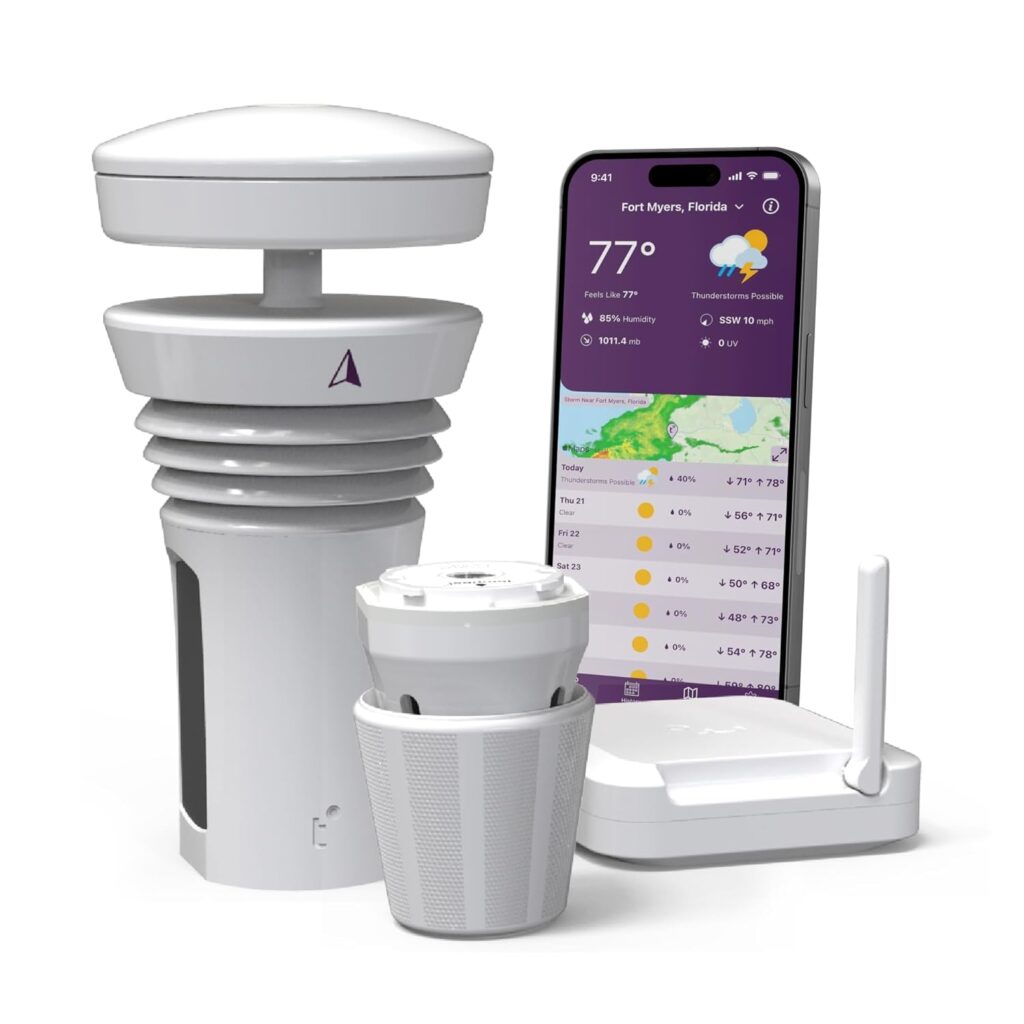
Best for: Serious weather hobbyists, smart home power users, and anyone who wants a premium, nearly maintenance-free station with genuinely impressive technology.
Why We Like It
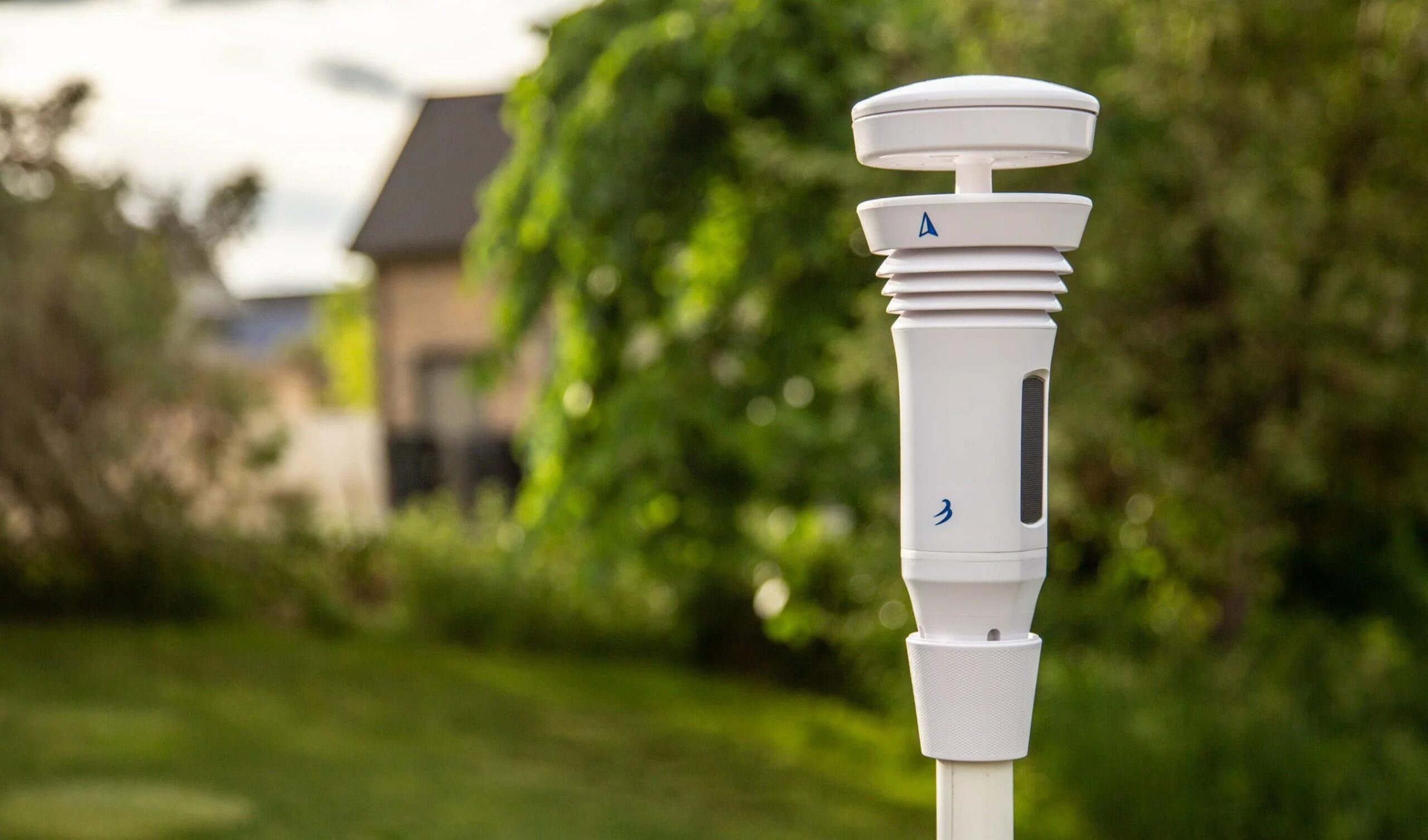
The Tempest is in a class of its own, and testing it made that obvious within the first hour. Everything about it is different from a traditional home weather station. It is a single compact unit about eight inches tall that houses every sensor in one sealed, no-moving-parts enclosure. No cups spinning in the wind. No tipping bucket filling with rainwater.
Just a sleek cylinder sitting on a pole, measuring everything through sonic, haptic, and optical technology.
Wind is measured sonically, meaning it detects airflow patterns rather than spinning cups. Updates come every three seconds, which is dramatically faster than any other station I tested. Rain is detected through a haptic sensor that feels individual drops striking the top of the unit and calculates intensity and accumulation. Lightning detection is built in, with strike alerts up to 40 kilometers away.
UV, solar radiation, temperature, humidity, dew point, barometric pressure, and wind chill are all covered too.
Installation is genuinely five minutes. Mount it on a pole, point north with your phone compass, drop the base station hub indoors near your router, open the app, and you are live. There is no console at all. Everything lives in the Tempest app, which is clean, well-designed, and shows real-time data updates every three seconds.
You can also share a personal weather page online, view historical graphs, and receive push alerts for rain onset and lightning.
Smart home integration is excellent. Alexa, IFTTT, and Rachio (smart irrigation) are all supported. Siri Shortcuts work too. In my testing, the Rachio integration was flawless. My sprinklers stopped the moment the Tempest detected rain, no delay.
Nearcast Technology, the machine learning system behind the Tempest, continuously compares your station’s live data against other nearby sources and trusted weather datasets to self-calibrate over time. After about 60 days of use, forecast accuracy improves noticeably. It is not just collecting data; it is getting smarter with your local conditions.
That said, the Tempest is not perfect. Temperature readings can run low in some mounting configurations if there is not enough airflow around the sensor. Wind readings can be inconsistent if the station is not positioned high enough and in an open area. And at around $340, it is the most expensive unit in this roundup by a wide margin. There is also no physical display.
For some people, glancing at an app versus a wall-mounted screen is a meaningful drawback.
But if you can live with those trade-offs, the Tempest is simply the most impressive home weather station I have ever tested.
Pros
- All sensors in one compact unit with no moving parts
- Updates every three seconds, fastest in this category
- Haptic rain sensor and sonic wind measurement are genuinely innovative
- Built-in lightning detection up to 40 km
- Installs in five minutes; fully solar powered with no ongoing battery replacement
- Alexa, IFTTT, Rachio, Siri, and Homey smart home integration
- Nearcast machine learning improves forecast accuracy over time
- Up to 1,000+ foot wireless transmission range
- Excellent customer support with fast warranty response
Cons
- No physical display console; everything is app-only
- At around $340, it is the most expensive unit in this guide
- Temperature readings can run slightly low if airflow around the sensor is limited
- Wind accuracy is placement-sensitive; requires open, elevated mounting
- Rain measurement via haptic sensor is still not as consistent as tipping bucket in some conditions
- No 5 GHz Wi-Fi support on the hub
Other Things to Consider Before You Buy
Battery Life and Power Options
Most outdoor sensors in this category run on AA or AAA batteries. The AcuRite Iris claims up to two years of battery life, which is one of the best in the lineup. The Ambient WS-2902’s outdoor sensor is solar-powered with optional battery backup, meaning you may never need to change a battery. The Tempest is fully solar-powered.
For the Sainlogic budget model, you will be swapping batteries more regularly.
Mounting Requirements
None of these units include a mounting pole. You will need to purchase one separately for proper sensor placement. For accurate wind and temperature readings, sensors should be mounted at least six to eight feet off the ground and away from walls, rooflines, and heat sources. Getting this right matters more than the station you buy.
Wi-Fi Band Limitations
Every Wi-Fi-connected station in this guide, including the Sainlogic, the WS-2902, and the Tempest hub, only works on 2.4 GHz Wi-Fi networks. If your router broadcasts only on 5 GHz, you will need to enable the 2.4 GHz band before setup. This catches a lot of buyers off guard.
Physical Display vs. App-Only
The Tempest is the only station here without a physical console display. If you like glancing at a tabletop or wall-mounted display for quick readings, the AcuRite, Ambient, and Sainlogic all have you covered. If you are comfortable checking an app, the Tempest’s app experience is the best of any station I tested.
Data History and Export
Ambient Weather Network stores up to a year of historical data accessible via web browser. Tempest offers historical graphs in the app and links directly to Weather Underground for long-term storage. Sainlogic offers basic history through their app. AcuRite without the smartHUB does not log historical data at all.
Expandability
The Ambient WS-2902 supports up to eight additional WH31 temperature and humidity sensors, plus PM2.5 air quality sensors. This makes it the most expandable system in the lineup. If you want to monitor multiple rooms or zones on your property, that flexibility is valuable.
Warranty and Support
AcuRite offers a one-year limited warranty. Ambient Weather is known for strong customer service, with the CEO reportedly involved in resolving support tickets directly. Tempest has impressed users with fast warranty response times, as several reviews noted receiving replacement units within days of filing a support request. Sainlogic offers US-based phone and email support with a 24-hour weekday response guarantee.
Related reading: recliners in depth.
Frequently Asked Questions
How accurate are home weather stations compared to official weather services?
Consumer home weather stations are not as accurate as National Weather Service instruments, but they are often more relevant to your daily life because they are measuring conditions at your specific location rather than at a distant airport or official monitoring site. Factors like sensor placement, sun exposure, and local obstacles affect accuracy significantly.
In practice, a well-placed mid-range station like the Ambient WS-2902 will give you temperature readings within one to two degrees of an official station and wind readings within a reasonable margin. Premium units like the Tempest use machine learning to continuously self-calibrate and narrow that gap over time. For general home use, gardening, and storm preparation, these stations are more than accurate enough.
Do I need a Wi-Fi weather station, or is a basic wireless one fine?
It depends entirely on what you want to do with the data. A basic wireless station like the AcuRite Iris is perfect if you just want to glance at a display to see current conditions and get a local forecast. You do not need Wi-Fi for that.
But if you want to check conditions remotely from your phone, share data with platforms like Weather Underground, set up smart home automations, or keep historical records, then a Wi-Fi-connected station is worth the extra cost. The Ambient WS-2902 is the best example of how much more you get when you go Wi-Fi, especially given its Alexa and IFTTT support at a mid-range price.
What is the best location to mount my outdoor weather sensor for accurate readings?
Placement is one of the most overlooked factors in weather station accuracy. Mount the sensor at least four to six feet above the ground (six to eight is better for wind). Keep it away from rooflines, walls, air conditioner vents, and paved surfaces, all of which create heat pockets that will throw off your temperature readings.
For wind accuracy, the sensor should be mounted in an open area, not tucked behind a fence or underneath tree cover. Point the north indicator on the sensor north using a compass app. If you get the placement wrong, even an expensive station will give you misleading data.
Can I connect my home weather station to smart home devices like Alexa or a smart sprinkler?
Only certain stations support smart home integration, and it is not universal. Of the units reviewed here, the Ambient WS-2902 and the Tempest Weather System both offer Alexa and Google Assistant support, as well as IFTTT integration which lets you trigger other smart devices based on weather conditions. The Tempest also works directly with Rachio smart sprinkler controllers.
The AcuRite Iris and Sainlogic units do not offer smart home integration in their base configurations. If smart home connectivity is a priority for you, the WS-2902 offers the most bang for the buck at around $150, while the Tempest is the premium choice for those willing to invest more.
How long do home weather stations typically last, and what maintenance do they need?
Most quality home weather stations last anywhere from three to seven years with proper care. The biggest enemy of outdoor sensors is direct sun, temperature extremes, and physical damage from severe weather. Moving parts like tipping-bucket rain gauges and spinning anemometer cups can wear out or clog with debris over time.
That is actually one of the reasons the Tempest’s no-moving-parts design is appealing for long-term reliability. Regular maintenance for traditional stations includes checking and cleaning the rain gauge funnel for debris, making sure the anemometer spins freely, and occasionally recalibrating sensors. Battery-powered sensors should have fresh batteries going into winter, as cold temperatures drain batteries faster.
Conclusion
If you have made it this far, you are serious about understanding your local weather, and that means there is genuinely a right choice for your situation.
For most people who are new to home weather monitoring, the Sainlogic Smart WiFi Weather Station (B0G8K2NRVZ) is the easiest starting point. It gives you a lot of sensor coverage at a price that does not hurt if you outgrow it. It is not perfect, but it does the basics honestly and well.
If you want a step up in reliability, display quality, and localized forecasting without needing internet connectivity, the AcuRite Iris 5-in-1 (01512M) is a dependable, proven choice. The self-calibrating forecast alone makes it worth the extra cost over budget alternatives, and the color display is one of the nicer ones in this price range.
For the biggest upgrade in value and features, the Ambient Weather WS-2902 is the clear winner. At its price point, nothing else delivers this combination of comprehensive sensor coverage, reliable Wi-Fi connectivity, smart home integration, and an excellent online dashboard.
If you have a smart home setup or simply want to share your data with the world, the WS-2902 should be at the top of your list.
And if money is less of a concern and you want the most sophisticated, low-maintenance home weather experience available to consumers right now, the Tempest Weather System is simply in a different league. The five-minute installation, three-second update intervals, built-in lightning detection, and machine-learning-powered forecasting make it the kind of product you set up once and forget about for years.
It is not cheap, and the lack of a physical display is a genuine trade-off, but if those things do not bother you, there is nothing better on the consumer market today.
Whatever you pick, just remember that placement matters as much as the station itself. Get the sensor out in the open, point it north, and give it a few weeks to settle in. Once it does, you will wonder how you ever made plans without it.





Leave a Reply