

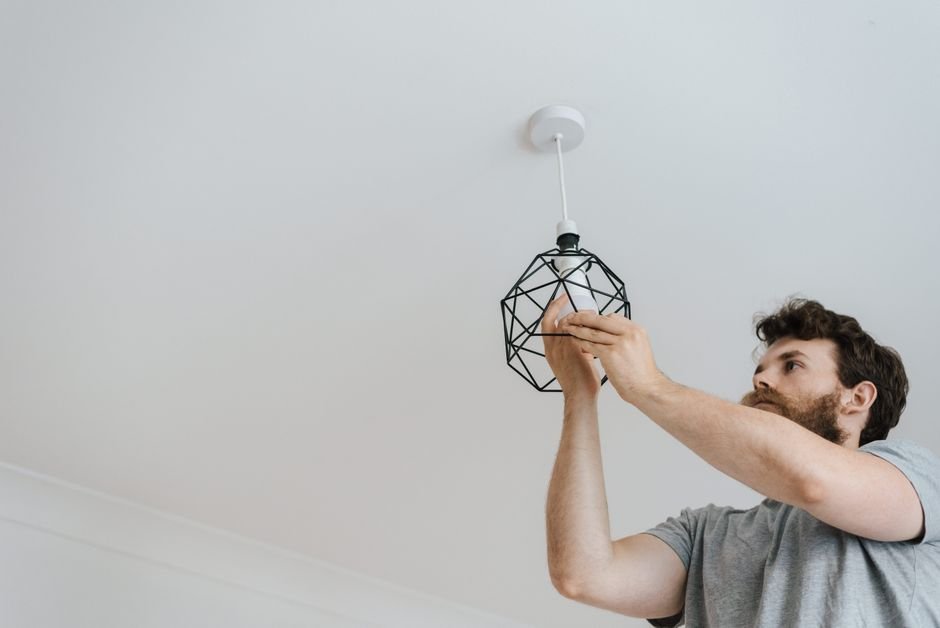
Many homeowners underestimate installation and end up purchasing smart bulbs that don't match their existing fixtures, leading to wasted money and time. It's crucial to ensure compatibility before starting your project. Here's a straightforward guide on how to install smart lights without the hassle.
Smart lights elevate your home lighting experience significantly, allowing you to adjust the brightness, color, and timing all from the palm of your hand via a smartphone app. With the right preparation and a bit of guidance, you can enhance your smart home setup in no time.

The Basics of Smart Lighting
Before diving into installation, it’s essential to choose the right smart bulbs. Most smart lights operate via Wi-Fi, meaning you’ll need a stable internet connection throughout your home. LED bulbs are the most popular choice due to their energy efficiency and longevity, often lasting up to 25,000 hours.
There are also options like color-changing bulbs, which can help set the mood for various activities and celebrations.
When selecting smart lights, ensure they are compatible with your existing devices. Some brands work best with specific smart home ecosystems, such as Amazon Alexa or Google Assistant. Reading reviews and product descriptions can prevent compatibility headaches down the line. Always check to see if the bulb type matches your fixtures, standard, recessed, or smart plugs for lamps.
Essential Tools for Installation
Gathering minimal tools can streamline the installation process. Here’s what you’ll typically need:
- Smart bulbs (of your choice)
- Smartphone or tablet
- Home Wi-Fi network and password
- Screwdriver (if necessary for any fixtures)
- Optional: Smart home hub if your bulbs require it
Having these tools ready will make the installation process seamless. It’s also wise to read through the manufacturer’s manual for specific guidance on your smart bulb model. Some lighting systems may have additional requirements, depending on how elaborate your setup needs to be.

Step-by-Step Installation Process
Now let’s get down to the nitty-gritty of installing your smart lights. First, make sure to turn off the power at the circuit breaker to avoid any electrical hazards. Once that’s done, remove your old bulbs and replace them with the smart bulbs you’ve chosen. Just screw them in as you would any light bulb.
Next, turn the power back on. Open the smart lighting app on your phone. Most smart lights prompt you to connect to your home Wi-Fi network. Follow the app’s instructions to link each bulb to your Wi-Fi. It’s usually as simple as selecting the bulb from a list and making sure you’re within a close range during setup.
For lights that require a hub, like the Phillips Hue system, make sure the hub is powered on and connected to your Wi-Fi before attempting to connect the bulbs. This usually involves syncing the hub with the app and ensuring the bulbs respond to commands.
Finalizing Your Smart Lighting Setup
For the best results, consider Philips Hue lights, which offer robust app features and compatibility with voice assistants. If you want a more budget-friendly option, Wyze bulbs are great for basic control and automation, making them suitable for those new to smart home technology.
The Verdict: Is It Worth It?
Absolutely. Upgrading to smart lights can enhance your living space both in terms of convenience and ambiance. If you value customization in your home environment, this technology is a game changer. With the right products, the installation process is straightforward, simplifying your life without turning your home into a tech dungeon.
In conclusion, whether you’re adding a single smart bulb or transforming your home lighting system, the benefits are undeniable. Remember, start small and expand as you become more comfortable with the technology.
If you’re also dealing with other smart home devices, like smart security cameras or smart plugs, I have detailed guides on those topics too, like Video Doorbell vs Security Camera and Motion Detection vs Continuous Recording Cameras to assist in creating your fully automated home. Additionally, for those looking for in-depth guidance on how to install smart lights, there are resources available that provide comprehensive insights into smart lighting systems.
Our write-up on kondo method picks up where this leaves off.
FAQs
How do I know if smart lights will work in my home?
Ensure that your home’s Wi-Fi signal is strong and that the smart bulbs are compatible with your existing devices. Most manufacturers provide compatibility information on their product page.
Can I control smart lights away from home?
Yes, if your smart lights are connected to Wi-Fi, you can control them remotely using their respective apps. Just ensure your home Wi-Fi is functioning properly.
Do smart lights save energy?
Smart lights, especially LED options, are designed to be more energy-efficient than traditional bulbs. They often consume less power and allow you to schedule lighting, helping reduce energy waste.
What if my smart light isn’t working?
If a smart bulb isn’t responding, check the app for connectivity, ensure the bulb is on and securely fastened, and confirm that your Wi-Fi network is functioning properly.




Leave a Reply