

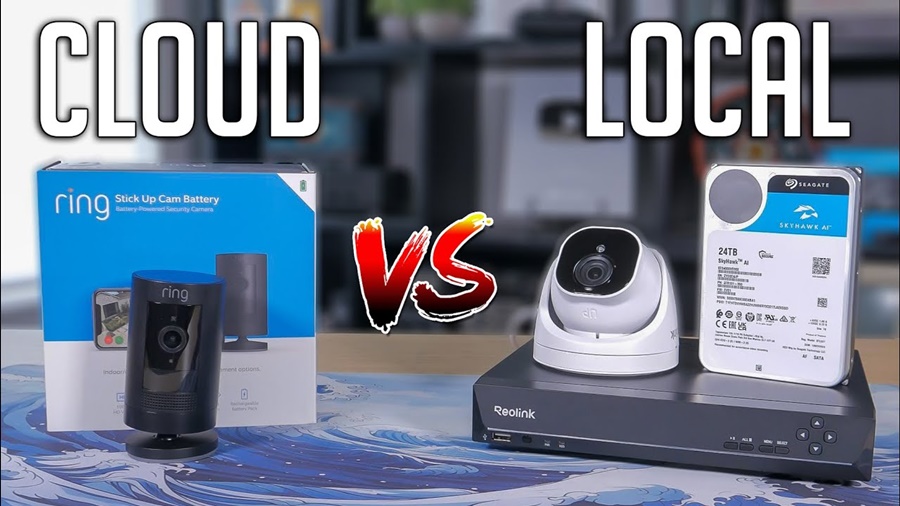
Whether you want to monitor your front door, warehouse, office, retail store, or vacation property, one of the most important decisions you will make is choosing between local storage and cloud storage for your security camera system. Security cameras have become an essential part of modern home and business protection.
Both options offer advantages and disadvantages in terms of cost, security, accessibility, reliability, and privacy. Understanding how each system works can help you choose the best solution for your needs.
This article explains the differences between local and cloud storage security cameras, compares their pros and cons, and helps you determine which option is right for you.

What Is Local Storage in Security Cameras?
Local storage means your security footage is stored physically on a device located at or near your property. The recordings are typically saved on:
- SD cards
- Hard drives (HDD)
- Solid-state drives (SSD)
- Network Video Recorders (NVR)
- Digital Video Recorders (DVR)
- USB storage devices
With local storage, the video data stays under your direct control unless you manually upload or share it online.
How Local Storage Works
When a camera records footage, the files are written directly to the connected storage device. Depending on the system, the recordings may be:
- Continuous (24/7 recording)
- Motion-triggered
- Scheduled recording
- Event-based recording
Most systems automatically overwrite old footage when storage becomes full.
Advantages of Local Storage Security Cameras
1. No Monthly Subscription Fees
One of the biggest benefits of local storage is avoiding recurring cloud subscription costs.
After purchasing the hardware, there are usually no ongoing fees unless you choose optional services.
This makes local storage more cost-effective over time.
Best For:
- Homeowners
- Small businesses
- Budget-conscious users
2. Greater Privacy Control
Since footage remains on your property, local storage offers stronger control over sensitive recordings.
You decide:
- Who accesses the footage
- How long it is stored
- Whether it is shared online
This reduces concerns about third-party access or external data breaches.
3. Works Without Internet
Most local storage systems continue recording even if the internet goes down.
This is extremely useful in:
- Rural areas
- Locations with unstable internet
- Power outage backup systems
- Remote construction sites
The camera system can still capture footage locally without cloud connectivity.
4. Faster Access to Footage
Because recordings are stored nearby, accessing video files is often quicker than downloading them from cloud servers.
This can be helpful when:
- Reviewing long recordings
- Exporting evidence
- Monitoring multiple cameras simultaneously
5. Higher Storage Capacity Options
NVR and DVR systems can support large hard drives capable of storing weeks or months of footage.
Businesses often prefer this for:
- Compliance requirements
- Long-term video retention
- Multi-camera surveillance
Disadvantages of Local Storage Security Cameras
1. Risk of Physical Theft or Damage
If a burglar steals or destroys the camera, DVR, or NVR, your footage may be lost permanently.
This is one of the biggest weaknesses of local storage systems.
Common Risks:
- Fire
- Flooding
- Theft
- Vandalism
- Hardware failure
2. Limited Remote Access
Some local systems require advanced setup for remote viewing.
Without internet-based features, accessing footage away from your property may be difficult.
Modern systems have improved this issue, but setup can still be more technical than cloud solutions.
3. Maintenance Responsibility
You are responsible for:
- Replacing failed drives
- Updating firmware
- Managing storage capacity
- Backing up footage
This may require technical knowledge.
4. Scalability Challenges
Adding more cameras may require:
- Larger storage drives
- More powerful NVR systems
- Additional network infrastructure
For large installations, upgrading local systems can become expensive.
What Is Cloud Storage in Security Cameras?
Cloud storage means your camera footage is uploaded over the internet to remote servers managed by a service provider.
Instead of storing video only on-site, recordings are saved securely in data centers.
Users typically access footage through:
- Mobile apps
- Web dashboards
- Desktop software
How Cloud Storage Works
When the camera records an event, the footage is encrypted and sent to online servers through your internet connection.
Depending on the subscription plan, footage may be stored for:
- 24 hours
- 7 days
- 30 days
- 90 days or more
Some services offer continuous recording, while others focus on motion-triggered events.
Advantages of Cloud Storage Security Cameras
1. Protection Against Theft and Damage
Since footage is stored off-site, recordings remain safe even if the camera or recorder is stolen.
This is one of the strongest benefits of cloud storage.
If a criminal damages the system, evidence may still be preserved online.
2. Easy Remote Access
Cloud systems are designed for convenience.
Users can:
- View live feeds
- Receive alerts
- Download recordings
- Share clips instantly
All from smartphones or computers anywhere in the world.
3. Automatic Updates and Maintenance
Cloud providers usually handle:
- Software updates
- Security patches
- Server maintenance
- Backup management
This reduces technical workload for users.
4. Smart Features and AI Integration
Many cloud camera systems include:
- Facial recognition
- Person detection
- Package detection
- Vehicle recognition
- Smart alerts
These advanced features often rely on cloud computing power.
5. Easy Scalability
Adding additional cameras is generally simple.
Cloud systems are ideal for:
- Expanding businesses
- Multi-location monitoring
- Franchises
- Retail chains
Disadvantages of Cloud Storage Security Cameras
1. Monthly or Annual Fees
Most cloud systems require ongoing subscriptions.
Costs vary depending on:
- Number of cameras
- Video quality
- Storage duration
- AI features
Over several years, subscription costs can become significant.
2. Dependence on Internet Connection
Without internet access:
- Uploading footage may stop
- Live viewing may fail
- Notifications may not work
Slow internet speeds can also reduce video quality or cause delays.
3. Privacy Concerns
Some users are uncomfortable storing private footage on third-party servers.
Potential concerns include:
- Data breaches
- Unauthorized access
- Government requests
- Service provider vulnerabilities
Although reputable providers use encryption, no online system is completely risk-free.
4. Limited Storage Retention
Cloud plans often restrict:
- Video history length
- Storage space
- Download limits
Users may need higher-tier plans for extended retention.
5. Bandwidth Usage
Uploading high-resolution footage continuously can consume large amounts of internet bandwidth.
This may impact:
- Home internet performance
- Data caps
- Network congestion
Especially with multiple 4K cameras
Security Comparison: Local vs Cloud Storage
Local Storage Security
Strengths
- Full physical control
- No third-party server exposure
- Lower online attack surface
Weaknesses
- Vulnerable to theft
- Hardware failure risks
- Requires manual backup
Cloud Storage Security
Strengths
- Off-site redundancy
- Professional data center protection
- Automatic backups
Weaknesses
- Internet-based attack risks
- Reliance on provider security
- Potential account hacking
Which Is Better for Privacy?
If maximum privacy is your top concern, local storage is generally the better choice.
Your recordings remain under your control and are less exposed to external systems.
However, properly secured cloud services with:
- Strong passwords
- Two-factor authentication
- Encryption
- Trusted providers
can still provide excellent protection.
Cost Comparison
| Feature | Local Storage | Cloud Storage |
|---|---|---|
| Initial Cost | Higher hardware cost | Lower upfront cost |
| Monthly Fees | Usually none | Ongoing subscription |
| Long-Term Cost | Often cheaper | Can become expensive |
| Maintenance | User-managed | Provider-managed |
Best Use Cases for Local Storage
Local storage works best for:
- Homeowners wanting privacy
- Rural properties with weak internet
- Businesses requiring long-term recording
- Users avoiding monthly fees
- High-camera-count systems
Best Use Cases for Cloud Storage
Cloud storage works best for:
- Smart home users
- Frequent travelers
- Small offices
- Remote monitoring
- Users wanting simple setup
- AI-powered security systems
Hybrid Storage: The Best of Both Worlds
Many modern security camera systems now support hybrid storage.
This combines:
- Local recording
- Cloud backup
Benefits include:
- Redundancy
- Improved security
- Remote accessibility
- Protection against theft
For example:
- Footage records locally on an NVR
- Important events upload to the cloud automatically
Hybrid systems are increasingly popular because they balance convenience and privacy.
Factors to Consider Before Choosing
1. Internet Reliability
Choose local storage if your internet is unstable.
Choose cloud storage if you have fast, reliable internet.
2. Budget
Local storage usually saves money long term.
Cloud storage spreads costs over time but may become more expensive.
3. Privacy Preferences
Privacy-focused users often prefer local systems.
Convenience-focused users may prefer cloud access.
4. Technical Skill Level
Cloud systems are easier for beginners.
Local systems may require more setup and maintenance knowledge.
5. Security Requirements
Businesses handling sensitive information may require:
- Local encrypted storage
- Hybrid backups
- Compliance-ready systems
Common Misconceptions
“Cloud Storage Is Always Safer”
Not necessarily.
Cloud providers invest heavily in cybersecurity, but online services can still face hacking attempts or outages.
“Local Storage Cannot Be Hacked”
Incorrect.
If connected to the internet, local systems can also be vulnerable without proper security settings.
“Cloud Cameras Always Need Subscriptions”
Some cameras offer limited free cloud storage or optional subscriptions.

Tips for Improving Security
Regardless of storage type:
Use Strong Passwords
Avoid weak or reused passwords.
Enable Two-Factor Authentication
Adds an extra layer of account protection.
Update Firmware Regularly
Security updates help prevent vulnerabilities.
Encrypt Your Data
Use systems supporting encrypted storage and transmission.
Backup Important Footage
Critical recordings should be duplicated when possible.
Conclusion
There is no universal winner between local storage and cloud storage security cameras. The best choice depends on your priorities.
Choose local storage if you want:
- Better privacy
- No monthly fees
- Offline recording
- Full control of your footage
Choose cloud storage if you want:
- Easy remote access
- Off-site backups
- Smart AI features
- Minimal maintenance
For many users, a hybrid system combining local and cloud storage offers the strongest overall solution.
By understanding the strengths and weaknesses of each approach, you can build a security camera system that matches your budget, privacy expectations, and security needs.





Leave a Reply